Supio alternatives (2026): when your systems aren’t on the list
Supio is a capable platform for plaintiff law and mass torts. Whether it fits often comes down to one question: does it connect to the case management your firm already runs on? Here’s how the alternatives compare.
The short answer
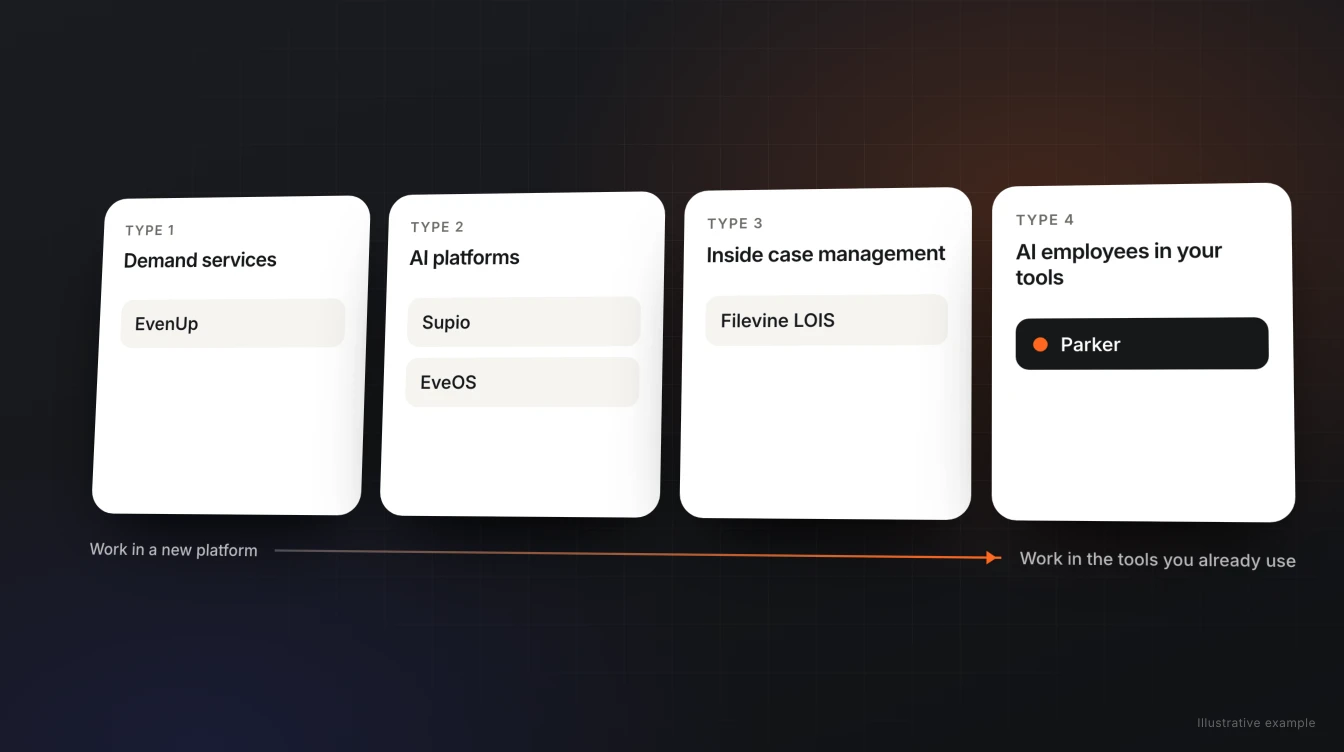
Start with your case management system, then decide where you want the work to happen.
- If your firm runs on Clio, Filevine, or MerusCase and wants the work to land in those systems, look at Parker.
- If you’re all-in on Filevine, look at Filevine’s own LOIS.
- If personal injury demands are your main bottleneck and you’d like a vendor’s legal team to finalize them, look at EvenUp.
- If you want one operating layer that also answers intake calls, look at EveOS.
- If your docket is complex, record-heavy litigation, look at Anytime AI.
- If you’d rather replace your case management with an AI-native one, look at ProPlaintiff.
- If you’d rather build the workflows yourself, a general-purpose assistant like Claude is an option.
If you’re on a system Supio lists, like Litify or SmartAdvocate, and you’re comfortable working in its workspace, Supio is worth a demo. Most firms that look elsewhere aren’t unhappy with its drafts. Their systems aren’t on its list, or they don’t want a second place to work.
Comparing Parker and Supio directly? See Parker vs. Supio for a side-by-side on integrations, where the work happens, and security as each company publishes it.
What Supio does
Supio describes itself as “the only agentic legal AI platform built for plaintiff law and mass torts cases.” Its Supio Agent works at both the case level and the firm level, from intake through active case work, medical record review, demands, and litigation drafting. Here’s how it describes itself, as of November 11, 2026:
| What Supio publishes | |
|---|---|
| What it is | An agentic legal AI platform for plaintiff law and mass torts |
| Where your team works | Supio’s platform; synced documents appear in a Supio case workspace |
| Case management | Litify, SmartAdvocate, MyCase, CASEpeer, Smokeball, Jove, and Neostella |
| Documents | Dropbox, OneDrive, SharePoint, Box, Progress ShareFile, and Google Drive |
| Communications | Outlook, Zoom, RingCentral, and Dialpad |
| Other connections | Westlaw Advantage (Thomson Reuters), QuickBooks, YoCierge, and Attorney Share, plus developer APIs |
| Security | SOC 2 Type II; HIPAA, PHIPA, and GDPR compliant; data centers in the U.S., UK, and Canada; client data never trains foundation models |
| Pricing | Not published on the pages we checked |
Where Supio is strong
- Mass torts. Supio is built for plaintiff law and mass torts, which few tools name directly.
- Firm-level visibility. Supio says firm owners get real-time visibility into case quality and productivity across the practice.
- Research partnership. Supio partners with Thomson Reuters and connects to Westlaw Advantage for citation checks.
- Published certifications. SOC 2 Type II, plus HIPAA, PHIPA, and GDPR compliance.
- Write-back to some systems. Supio says it can push structured insights back to Litify and SmartAdvocate.
If those are what your firm needs most, and your systems are on its list, Supio is a reasonable choice.
Why firms look for a Supio alternative
- Their case management isn’t on the list. As of November 11, 2026, Clio, Filevine, and MerusCase don’t appear on Supio’s integrations page.
- They don’t want a second workspace. Supio’s FAQ describes synced documents appearing in a Supio case workspace. Some firms want drafts to land in their own case management and inbox instead.
- They want to delegate where they already talk. Firms that run on email and Slack want to hand off work there, without logging in to another platform.
- Their practice isn’t mostly PI or mass torts. Employment, workers’ compensation, and consumer firms want an AI configured around those matters.
- They want a published starting point on price. Supio doesn’t publish pricing on the pages we checked.
Seven Supio alternatives, by the systems you run on
Each description uses the vendor’s own published claims as of November 11, 2026. We’ve left out vendor-reported results we can’t verify, like settlement increases and hours saved.
| Alternative | Best if you want… | Where your team works | Case management named on its site |
|---|---|---|---|
| Parker | An AI employee that does casework across your existing systems, with your templates | Web chat, email, and Slack; finished work lands in your own systems | Clio, Filevine, and MerusCase; new integrations within 48 hours |
| Filevine LOIS | AI agents built directly into Filevine | Filevine | Filevine |
| EvenUp | PI demands, with the option of having its legal team finalize them | EvenUp’s platform | Litify, SmartAdvocate, and CASEpeer, “and more” |
| EveOS | One operating layer with 24/7 intake, nightly audits, and drafting agents | EveOS | SmartAdvocate and Lead Docket; also lists Litify and Clio Grow under CRM |
| Anytime AI | Agents built for complex litigation, like nursing home, medical malpractice, trucking, and TBI cases | Anytime AI’s platform | SmartAdvocate and Litify |
| ProPlaintiff | An AI-native case management platform for PI firms | ProPlaintiff, as your case manager | Imports from Clio, Filevine, and MyCase |
| Claude (general-purpose AI) | A flexible assistant, if you’re prepared to build the connections and workflows yourself | The Claude app | Depends on the connectors you set up |
A pattern worth noticing: several platforms in this category connect to the same group of PI case management systems, like Litify and SmartAdvocate. If your firm runs on Clio, Filevine, or MerusCase, your realistic shortlist is shorter.
Filevine LOIS
Filevine’s LOIS (“Legal AI that runs the firm”) runs agents across every Filevine matter, setting tasks, moving deadlines, and generating documents, with each action traceable to source. A fit if nearly all of your case information lives in Filevine. If records also arrive by email or sit in shared drives, see Parker vs. Filevine AI.
EvenUp
EvenUp describes itself as a “proactive AI platform for the entire case lifecycle,” built for personal injury. It offers Express Demands, which your team finalizes, and Expert-Reviewed Demands, finalized by its legal professionals in 1–5 days. Pricing is case-based and not published. See EvenUp alternatives and Parker vs. EvenUp.
EveOS
Eve describes EveOS as “the AI operating layer for plaintiff lawyers,” with intake that answers calls 24/7, a nightly Auditor of every active matter, drafting agents, and research. Eve says firms can keep their existing case management or use EveOS as their primary system. See Eve alternatives and Parker vs. Eve.
Anytime AI
Anytime AI calls itself an “agentic coworker for complex litigation,” with built-in agents for medical chronologies, demand letters, discovery, negligence and staffing analysis, drafting, and research, plus custom agents. It names SmartAdvocate and Litify integrations and lists SOC 2 and HIPAA on its security page. A fit for large-record cases, especially if you’re on one of those two systems.
ProPlaintiff
ProPlaintiff describes itself as an “AI case management platform for personal injury firms,” with AI demand letters, medical chronologies, and an AI paralegal called Tiff. It imports cases from Clio, Filevine, and MyCase. Its Clio connection requires creating a developer application in Clio’s Developer Portal. A fit if you’d rather move your case management into one AI-native system than add AI to the one you have.
Claude, or another general-purpose assistant
Claude is a general-purpose AI assistant from Anthropic, which describes it as helping legal teams with contract review, research, drafting, and diligence. Your team builds the connections and workflows yourself, one person at a time. We’ve written about what that involves for Clio, Filevine, and MerusCase.
For how these tools are built more broadly, see our guide to AI for plaintiff law firms.
How Parker works differently
- It connects to the systems Supio doesn’t list. Parker works with Clio, Filevine, and MerusCase, plus Google Workspace, Microsoft 365, Slack, Airtable, and Dropbox. Our team can add a new integration within 48 hours.
- There’s no second workspace. Assign work by web chat, email, or Slack. Drafts come back in the same place and in your own systems.
- Firm-wide memory. Teach Parker a template or a correction once, and every attorney benefits, within the access boundaries you set.
- Work that starts itself. When a matter reaches a stage, Parker can start the next draft. Case audits can run on a schedule, even when your team is offline.
- Your own server, your choice of models. Each firm’s Parker runs on a dedicated server, and we never train models on your data. Parker supports frontier and open-source models.
- Your attorneys stay in charge. Parker prepares the work. Your attorneys review and approve it before anything is filed or sent. Parker never sends on its own.
For the full side-by-side, see Parker vs. Supio.
How we set Parker up for your firm
Hiring Parker comes with our team. We help your team choose workflows, connect your systems, and get Parker working.
The workflows you start with
We help you choose the first workflows to hand off, like chronologies, case audits, demand and discovery drafts, and case summaries. Work can start when you ask (by web chat, email, or Slack), when a matter reaches a stage, or on a schedule, like weekly case audits.
The systems we connect
During setup, we connect Parker to your case management, email, and document systems. If you need another integration, we can add it within 48 hours.
| System | How it connects |
|---|---|
| Clio | Sign in to Clio from Parker’s Integrations page, name the account, choose team-only or private access, and approve in Clio. No developer app. |
| Filevine | We recommend a dedicated Filevine seat for Parker. Enter your firm’s Filevine address and the account’s sign-in, then confirm with Filevine’s verification code. |
| MerusCase | A MerusCase admin registers Parker under Tools & Settings, then 3rd Party Apps, and authorizes the right person’s access. Our team walks you through it during onboarding. |
Your templates and preferences
We start with the templates and prior work your team trusts. As attorneys correct tone, structure, and formatting, Parker retains those preferences, and what one person teaches can benefit the rest of the firm.
Timeline
New integrations can be added within 48 hours. Most of the onboarding is teaching Parker your templates and preferences, which every attorney then benefits from.
How to decide
- Start with your case management system. If Supio lists it and you’re happy to work in Supio, it’s worth a demo. If you’re on Clio, Filevine, or MerusCase, check which tools actually name your system.
- Decide where you want the work to live: a new platform, or the tools you already use.
- Run one closed case through each tool with the same records and instructions. Compare the drafts for missed injuries or bills, accuracy, and how much editing each needed.
- Time the whole process, including document syncs, back-and-forth, and attorney review.
- Ask every vendor for security details in writing, including where your data is stored, whether it’s kept apart from other firms’ data, and who can access it.
- Get pricing in writing for your real team size and case volume.
Frequently asked questions
What does Supio do?
Supio is an agentic legal AI platform for plaintiff law and mass torts. Its Supio Agent works at the case and firm level, covering intake, medical record review, demands, and litigation drafting, and it partners with Thomson Reuters for Westlaw citation checks.
Does Supio integrate with Clio, Filevine, or MerusCase?
As of November 11, 2026, none of the three appears on Supio’s integrations page. The page lists Litify, SmartAdvocate, MyCase, CASEpeer, Smokeball, Jove, and Neostella. Supio’s FAQ on that page still names the first six and not Neostella. Check with Supio for the latest list.
What is the best Supio alternative for Clio firms?
Parker connects to Clio by signing in from Parker’s Integrations page, with no developer app, and works from your Clio matters alongside email, Slack, and documents. ProPlaintiff can import Clio matters into its own case management platform.
What is the best Supio alternative for Filevine firms?
If nearly everything lives in Filevine, Filevine’s own LOIS is a natural fit. If records also arrive by email or sit in shared drives, Parker works across Filevine and those systems.
How much does Supio cost?
Supio doesn’t publish pricing on the pages we checked. Ask for a written quote for your team size and case volume. You can get started with Parker for free, and we walk through firm-wide pricing on a demo.
Is Supio more secure than Parker?
They publish different things. Supio lists SOC 2 Type II and HIPAA, PHIPA, and GDPR compliance. Parker gives each firm its own dedicated server and never trains models on firm data. Ask any vendor for its security details in writing.
How long does Parker take to set up?
Our team helps choose your first workflows and connect your systems. New integrations can be added within 48 hours. Most of the onboarding is teaching Parker your templates and preferences, which every attorney then benefits from.
What is the AI systems review?
A conversation with our team about how your firm uses AI today, which workflows are worth automating first, and how we would set Parker up to handle them. You can also bring a closed case and see what Parker hands back.
Which practice areas does Parker support?
Parker supports plaintiff-side work across personal injury, employment, workers’ compensation, and consumer matters.
Sources
- Supio homepage (checked November 11, 2026)
- Supio: Integrations (checked November 11, 2026)
- Filevine homepage (checked November 11, 2026)
- EvenUp homepage (checked November 11, 2026)
- EvenUp: Demands (checked November 11, 2026)
- EvenUp: Integrations (checked November 11, 2026)
- Eve homepage (checked November 11, 2026)
- Eve: Platform (checked November 11, 2026)
- Anytime AI homepage (checked November 11, 2026)
- Anytime AI: Personal injury (checked November 11, 2026)
- Anytime AI: Security (checked November 11, 2026)
- ProPlaintiff homepage (checked November 11, 2026)
- ProPlaintiff: Integrations & data migration (checked November 11, 2026)
- Claude for legal teams (checked November 11, 2026)
See what’s worth automating at your firm.
We’ll review how your team uses AI today, which workflows to automate first, and how our team would set Parker up inside the systems you already run on. Want to see Parker on your own work? Bring a closed case and compare what it hands back.