EvenUp alternatives (2026): when you need more than demands
EvenUp built its name on AI demand packages. If your firm needs help with everything around the demand too, here’s how the alternatives compare, and how to test any of them before you switch.
The short answer
The right EvenUp alternative depends on why you’re looking.
- If you want an AI that handles demands and the rest of your casework inside your own tools, look at an AI employee like Parker.
- If you want one platform from intake through settlement, look at Supio or EveOS.
- If your firm runs entirely on Filevine, look at Filevine’s own LOIS.
- If your cases are complex, record-heavy litigation, look at Anytime AI.
- If you want to replace your case management with an AI-native one, look at ProPlaintiff.
- If you’d rather build the workflows yourself, a general-purpose assistant like Claude is an option.
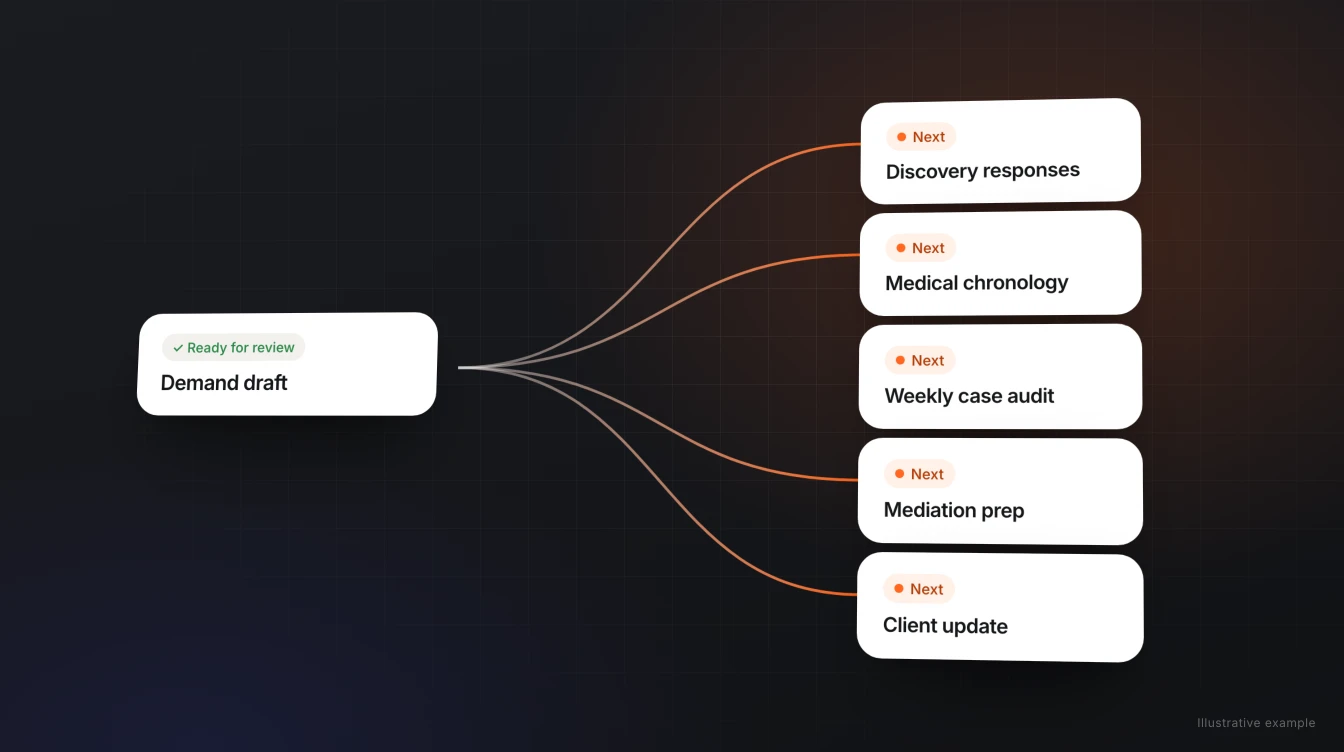
EvenUp is a strong option for personal injury demands. Most firms that go looking for alternatives aren’t unhappy with a demand. They’ve realized the demand is one assignment among dozens that pile up on every case.
Comparing Parker and EvenUp directly? See Parker vs. EvenUp for a side-by-side on where the work happens, what each connects to, and who finalizes the draft.
What EvenUp does
EvenUp is best known for AI-generated demand packages and medical chronologies for personal injury firms, and now describes itself as a “proactive AI platform for the entire case lifecycle,” from intake through trial. On demands, it offers two tracks, as of November 11, 2026:
| Express Demands | Expert-Reviewed Demands | |
|---|---|---|
| Who drafts | EvenUp’s AI, in minutes | EvenUp’s AI, then reviewed by its team of 150+ legal professionals |
| Who finalizes | Your team | EvenUp, delivered finalized in 1–5 days |
| Suggested for | Straightforward liability cases | Complex liability cases |
| Pricing | Case-based; not published | Case-based; not published |
EvenUp’s integrations page names Litify, SmartAdvocate, and CASEpeer among the case management systems it syncs with, “and more,” plus SharePoint, Google Drive, and Dropbox for documents. Clio, Filevine, and MerusCase aren’t named on the pages we checked.
Why firms look for an EvenUp alternative
- The bottleneck isn’t only demands. Discovery responses, records follow-up, case audits, and client updates eat as much time as the demand itself.
- They want the work in their own systems. Some firms would rather have drafts land in their case management, inbox, and templates than manage another platform.
- They want their own templates and voice. Firms with a house style want an AI that learns it and applies it everywhere.
- Their practice goes beyond personal injury. Employment, workers’ compensation, and consumer firms need help on matters that don’t end in a PI demand.
- They want a different pricing model. Case-based pricing suits some firms. Others want a predictable firm-wide cost.
Seven EvenUp alternatives, by what you need
Each description uses the vendor’s own published claims as of November 11, 2026. We’ve left out vendor-reported results we can’t verify, like settlement increases and time savings.
| Alternative | Best if you want… | Where your team works | Case management named on its site |
|---|---|---|---|
| Parker | An AI employee that handles demands and the rest of your casework, with your templates | Web chat, email, and Slack; finished work lands in your own systems | Clio, Filevine, and MerusCase; new integrations within 48 hours |
| Supio | One agentic platform for plaintiff law and mass torts, from intake to litigation drafting | Supio’s platform | Litify, SmartAdvocate, MyCase, CASEpeer, Smokeball, Jove, and Neostella |
| EveOS | One operating layer for intake, nightly case audits, drafting agents, and research | EveOS | SmartAdvocate and Lead Docket; also lists Litify and Clio Grow under CRM |
| Filevine LOIS | AI agents built directly into Filevine, if your firm lives there | Filevine | Filevine |
| Anytime AI | Agents built for complex litigation, like nursing home, medical malpractice, trucking, and TBI cases | Anytime AI’s platform | SmartAdvocate and Litify |
| ProPlaintiff | An AI-native case management platform for PI firms, with demands and chronologies built in | ProPlaintiff, as your case manager | Imports from Clio, Filevine, and MyCase |
| Claude (general-purpose AI) | A flexible assistant, if you’re prepared to build the connections and workflows yourself | The Claude app | Depends on the connectors you set up |
Supio
Supio calls itself “the only agentic legal AI platform built for plaintiff law and mass torts,” with Supio Agent working at both the case level and the firm level. It partners with Thomson Reuters for Westlaw citation checks and publishes SOC 2 Type II, HIPAA, PHIPA, and GDPR compliance. A fit if your case management is on its list and you’re comfortable working in Supio’s workspace. For more, see Supio alternatives and Parker vs. Supio.
EveOS
Eve describes EveOS as “the AI operating layer for plaintiff lawyers,” bundling 24/7 intake, a nightly Auditor of every active matter, drafting agents, research, and a data layer called Atlas. Its firm analytics product, Analyst, is described as in design and available to waitlist firms. A fit if you want one new system at the center of the firm. See Eve alternatives and Parker vs. Eve.
Filevine LOIS
Filevine’s LOIS (“Legal AI that runs the firm”) runs agents across every Filevine matter, setting tasks, moving deadlines, and generating documents. A fit if nearly all of your case information lives in Filevine. See Parker vs. Filevine AI.
Anytime AI
Anytime AI calls itself an “agentic coworker for complex litigation,” with built-in agents for medical chronologies, demand letters, discovery, negligence and staffing analysis, drafting, and research, plus custom agents built around a firm’s templates. It names SmartAdvocate and Litify integrations and lists SOC 2 and HIPAA on its security page. A fit if your docket leans toward large-record cases like nursing home neglect, medical malpractice, or trucking.
ProPlaintiff
ProPlaintiff describes itself as an “AI case management platform for personal injury firms,” with AI demand letters, medical chronologies, document generation, and an AI paralegal it calls Tiff. Firms on Clio, Filevine, or MyCase can import their cases into it. Its FAQ describes per-seat pricing with volume discounts; prices aren’t published on the pages we checked. A fit if you’re ready to move your case management into one AI-native system.
Claude, or another general-purpose assistant
Claude is a general-purpose AI assistant from Anthropic, which describes it as helping legal teams with contract review, research, drafting, and diligence. It’s flexible and capable. The tradeoff is that your team builds the connections and workflows yourself, and each person’s setup is their own. We’ve written about what that involves for Clio, Filevine, and MerusCase.
For a wider look at how these tools are built, see our guide to AI for plaintiff law firms.
How Parker handles demands differently
Parker treats a demand as one assignment among many, not the product. That changes how it works:
- It starts from your records where they live. Parker works from your case management, email, and document storage, so there’s no separate upload step.
- It writes in your firm’s format. Parker learns from the demands and templates your attorneys already trust, and corrections carry forward.
- It can start on its own. When a matter reaches the right stage, Parker can begin the draft and have it waiting for review.
- It keeps going after the demand. The same Parker handles discovery responses, chronologies, case summaries, evaluations, mediation preparation, and case audits.
- Your attorneys stay in charge. Parker prepares the draft; your attorneys review and approve it before it goes out. Parker never sends on its own.
For the full side-by-side, including security and pricing as each company publishes them, see Parker vs. EvenUp.
How we set Parker up for your firm
Hiring Parker comes with our team. We help your team choose workflows, connect your systems, and get Parker working.
The workflows you start with
We help you choose the first workflows to hand off, usually the recurring work that happens on most cases and already gets an attorney’s review. Work can start three ways:
- When you ask, by web chat, email, or Slack.
- When a matter reaches a stage, so the next draft is waiting for review.
- On a schedule, like weekly case audits.
The systems we connect
During setup, we connect Parker to your case management, email, and document systems: Clio, Filevine, or MerusCase, plus Google Workspace, Microsoft 365, Slack, Airtable, and Dropbox. If you need another integration, we can add it within 48 hours.
| System | How it connects |
|---|---|
| Clio | Sign in to Clio from Parker’s Integrations page, name the account, choose team-only or private access, and approve in Clio. No developer app. |
| Filevine | We recommend a dedicated Filevine seat for Parker. Enter your firm’s Filevine address and the account’s sign-in, then confirm with Filevine’s verification code. |
| MerusCase | A MerusCase admin registers Parker under Tools & Settings, then 3rd Party Apps, and authorizes the right person’s access. Our team walks you through it during onboarding. |
Your templates and preferences
We start with the templates and prior work your team trusts. As attorneys correct tone, structure, and formatting, Parker retains those preferences. What one person teaches Parker can benefit the rest of the firm, within the access boundaries you set.
Timeline
New integrations can be added within 48 hours. Most of the onboarding is teaching Parker your templates and preferences, which every attorney then benefits from.
How to test any alternative before you switch
- Pick a closed case. Use one where you know the records, the demand you sent, and the outcome.
- Run it through each tool. Give every vendor the same records and the same instructions.
- Compare the drafts side by side. Look for missed injuries or bills, accuracy of the medical summary, and how much editing each needed.
- Time the whole process. Include uploads, back-and-forth, and your attorney’s review, not just the drafting.
- Check where the work lands. Note whether the draft comes back in your case management and templates, or in another platform someone has to log in to.
- Get pricing in writing for your real monthly case volume.
Frequently asked questions
What does EvenUp do?
EvenUp is best known for AI-generated demand packages and medical chronologies for personal injury firms. As of November 11, 2026 it offers Express Demands, drafted by AI in minutes and finalized by your team, and Expert-Reviewed Demands, reviewed by its legal professionals and delivered finalized in 1–5 days.
How much does EvenUp cost?
EvenUp describes its pricing as case-based and doesn’t publish prices on its website. Ask for a written quote based on your monthly case volume.
What is the best EvenUp alternative?
It depends on your need. For demands plus the rest of your casework inside your own tools, consider Parker. For one platform from intake to settlement, consider Supio or EveOS. For AI inside Filevine, consider Filevine LOIS. For complex, record-heavy litigation, consider Anytime AI. To replace your case management with an AI-native system, consider ProPlaintiff.
Which EvenUp alternatives work with Clio, Filevine, or MerusCase?
Parker connects to all three. Filevine LOIS is built into Filevine. ProPlaintiff imports cases from Clio, Filevine, and MyCase into its own platform. As of November 11, 2026, Supio, EveOS, and Anytime AI don’t name Clio Manage, Filevine, or MerusCase on the pages we checked.
Can we use Claude instead of a legal AI tool?
You can, if your firm is prepared to build and maintain the connections, prompts, and workflows yourself. Claude is a general-purpose assistant. It doesn’t come set up with your case management, templates, or review process.
Can Parker draft demand letters?
Yes. Parker drafts demands from the records in your case management, email, and documents, using your firm’s templates, for attorney review. It also handles discovery responses, chronologies, case summaries, evaluations, mediation preparation, and case audits.
How long does Parker take to set up?
Our team helps choose your first workflows and connect your systems. New integrations can be added within 48 hours. Most of the onboarding is teaching Parker your templates and preferences, which every attorney then benefits from.
What is the AI systems review?
A conversation with our team about how your firm uses AI today, which workflows are worth automating first, and how we would set Parker up to handle them. You can also bring a closed case and see what Parker hands back.
Does Parker work outside personal injury?
Yes. Parker supports plaintiff-side work across personal injury, employment, workers’ compensation, and consumer matters.
How should we compare demand tools?
Run the same closed case through each tool with the same records and instructions, compare the drafts for missed injuries, bills, and accuracy, time the full process including review, and get pricing in writing.
Sources
- EvenUp: Demands (checked November 11, 2026)
- EvenUp homepage (checked November 11, 2026)
- EvenUp: Integrations (checked November 11, 2026)
- Supio homepage (checked November 11, 2026)
- Supio: Integrations (checked November 11, 2026)
- Eve homepage (checked November 11, 2026)
- Eve: Platform (checked November 11, 2026)
- Filevine homepage (checked November 11, 2026)
- Anytime AI homepage (checked November 11, 2026)
- Anytime AI: Personal injury (checked November 11, 2026)
- Anytime AI: Security (checked November 11, 2026)
- ProPlaintiff homepage (checked November 11, 2026)
- ProPlaintiff: Integrations & data migration (checked November 11, 2026)
- ProPlaintiff: FAQ (checked November 11, 2026)
- Claude for legal teams (checked November 11, 2026)
See what’s worth automating at your firm.
We’ll review how your team uses AI today, which workflows to automate first, and how our team would set Parker up for them. Want to see Parker on your own work? Bring a closed case and compare the draft to what you sent.