Can Claude work on your cases while you sleep?
Claude’s scheduled tasks now run in the cloud, and ChatGPT has its own. Here’s what they can do for a law firm, where they stop, and what firm owners really mean by “working while we sleep.”
The short answer
Partly. Claude’s scheduled tasks now run in Anthropic’s cloud, so a saved prompt can run hourly, daily, or weekly with your laptop closed. ChatGPT has scheduled tasks too. But a timer isn’t a paralegal. These tasks run on a clock rather than on what happens in your cases, each one belongs to the person who created it, and they can only reach systems with a cloud connector, which Clio and MerusCase don’t have.
If you want your firm’s casework moving overnight (audits across every open matter, drafts started when a case changes stage, results waiting for the team in the morning), that’s the job Parker was built for.
What Claude and ChatGPT can do on a schedule
| Claude scheduled tasks | ChatGPT scheduled tasks | Parker | |
|---|---|---|---|
| Runs with your computer off | Yes, unless the task needs local files or apps | Yes | Yes, on your firm’s dedicated server |
| What starts the work | A timer: hourly, daily, weekdays, or weekly | A timer, no more than once an hour | A request, a schedule, or a change in a case |
| Reaches Clio, Filevine, MerusCase | Filevine through its official connector; Clio and MerusCase only through custom connectors | No official Filevine or MerusCase plugins | All three |
| Who it belongs to | The person who created it | The person who created it | Firm-wide routines set up with our team, plus tasks members create |
| What you get back | A session with the results, for that person | A chat and a notification | Drafts and analysis ready for attorney review |
Claude’s scheduled tasks are available on all paid plans and can use the connectors and plugins you’ve set up. A task that needs local files or apps runs only on your computer, which matters if your case management connector is a homegrown one running on a laptop. ChatGPT’s scheduled tasks, relaunched in June 2026, can use connected apps but cap how many tasks each plan can have active and may pause tasks that go unattended.
Where scheduled prompts shine
For personal productivity, they’re genuinely useful. An attorney can get a morning summary of yesterday’s email, a weekly digest of Slack threads, or a running watch on a topic in the news. If that’s the goal, set one up and enjoy it.
Why a timer isn’t a paralegal
- Cases don’t run on a clock. Records arrive, a client finishes treatment, discovery is served. The right moment to start work is an event, not 9 AM on Mondays.
- Each task is one person’s. If the paralegal who set up the Monday audit leaves, so does the audit. The firm has no shared view of what’s running.
- Your case system has to be reachable. Without an official connector, Clio and MerusCase data isn’t available to a cloud task unless you build and host something yourself.
- A report isn’t a draft. A summary in someone’s chat history still has to become the letter, discovery response, or chronology the case needs.
- Firm standards live in individual setups. Templates and corrections stay in each person’s projects and memory instead of becoming the firm’s way of working.
What “working overnight” looks like for a firm
Here’s what firm owners usually mean when they ask whether AI can work while they sleep:
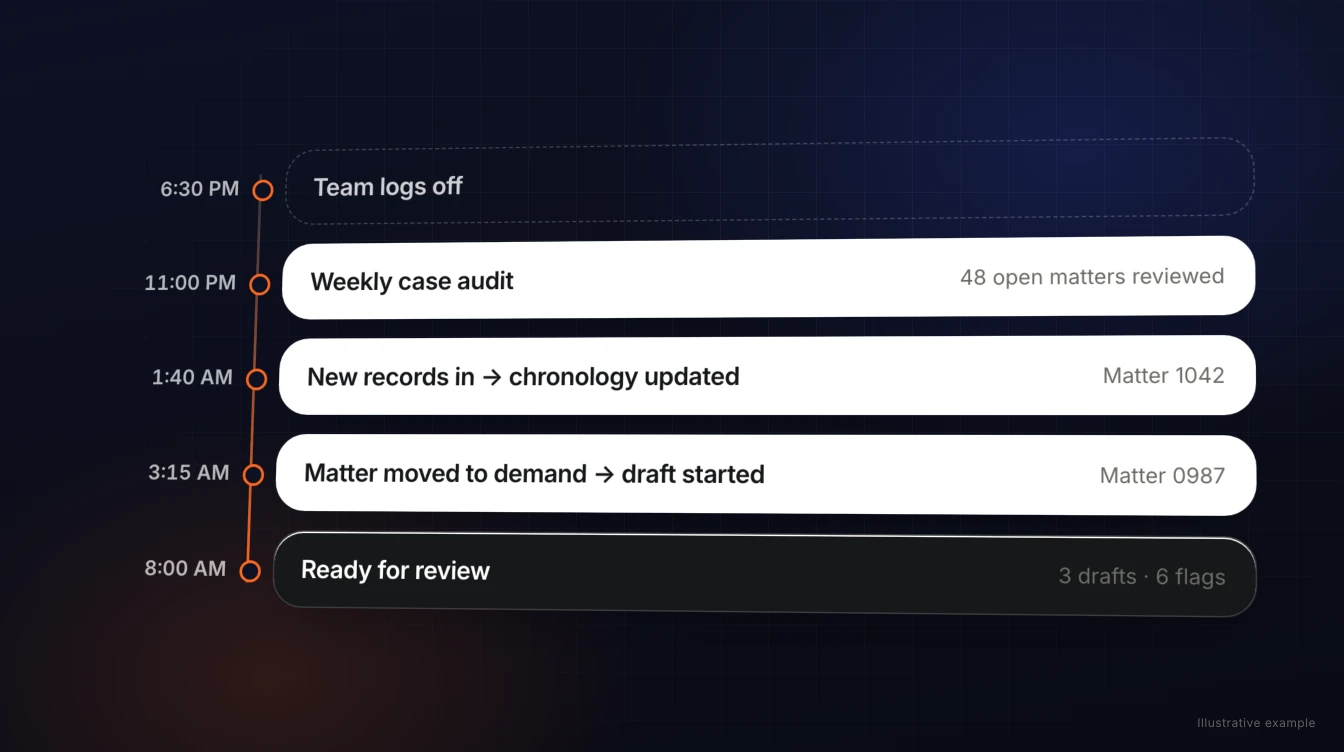
- Every open matter reviewed weekly, with a list of cases missing records or looking stalled, waiting Monday morning.
- Drafts started when cases change, so the demand or discovery responses are ready for review instead of waiting in someone’s queue.
- Results ready when the team logs in, not scattered across individual chat histories.
- Work done in the firm’s format, using the templates and corrections the whole team has built up.
- Attorneys reviewing, not assembling, because the first draft is already done.
How Parker works after hours
Parker is an AI employee for plaintiff firms. It runs on your firm’s own dedicated server, connects to Clio, Filevine, or MerusCase plus your email, Slack, and document storage, and keeps working when your team goes home.
- Recurring work in the background, like weekly case audits across your open matters.
- Work that starts when a case changes, so drafts are waiting when a matter reaches the next stage.
- Assignments by chat, email, or Slack, any time of day, with results delivered back the same way.
- Routines built for the firm. Our team sets up firm-wide recurring work with you during onboarding, and the templates and corrections Parker learns benefit everyone, within the access you set.
- Attorneys stay in control. Nothing is filed or sent without your team’s review.
Frequently asked questions
Can Claude run tasks while my computer is off?
Yes. Claude’s scheduled tasks run remotely on paid plans, so they keep their schedule even when your computer is asleep or the desktop app is closed. A task that needs local files or apps runs only on your computer.
How often can Claude scheduled tasks run?
Claude offers hourly, daily, weekday, and weekly schedules, or on demand. ChatGPT’s scheduled tasks can’t run more than once an hour, and each plan has a cap on active tasks.
Can a scheduled Claude task read my Clio or MerusCase cases?
Not through an official connector. As of October 19, 2026, neither Clio nor MerusCase has one for Claude. Filevine does. Custom connectors are possible, but one that runs on your own computer only works while that computer is on.
Can scheduled tasks react when a case changes?
No. Claude and ChatGPT scheduled tasks run on a timer. They don’t start work when a matter changes stage or new records arrive.
How does Parker work after hours?
Parker runs on your firm’s dedicated server. Recurring work like weekly case audits runs in the background, work can start when a case reaches a new stage, and the drafts are ready for attorney review when your team logs in.
Who sets up Parker’s recurring work?
Our team sets up firm-wide routines with you during onboarding, and members can ask Parker for their own recurring tasks too.
Sources
- Claude Help Center: Schedule recurring tasks in Claude Cowork (checked October 19, 2026)
- Claude Help Center: Use Claude Cowork on web, desktop, and mobile (checked October 19, 2026)
- IT Brief: OpenAI expands ChatGPT scheduled tasks with new hub (June 19, 2026)
- Claude connector directory: Filevine (checked October 19, 2026)
Wake up to work that’s already done.
Connect your case management, pick the recurring work you want handled, and see it waiting for review.